
Microsoft Visio is a powerful diagramming and visual communication tool from Microsoft. While many people are familiar with Outlook, Word, and Excel, Visio is often overlooked. Visio allows you to create professional flowcharts, organization charts, network diagrams, timelines, floor plans, process maps, and many other visual representations of information. With pre-built templates and shapes, Visio makes it easy for users to build clear diagrams quickly. You can also import AutoCAD drawings to build on existing designs and add text, shapes, with data as needed.
What is Microsoft Visio?
Microsoft Visio is a software designed to help you visualize complex information through diagrams and charts. Common examples include flowcharts, organization charts, network diagrams, timelines, process maps, floor plans, and systems diagrams. Visio also supports data visualization, letting you link data from sources like Excel or SharePoint into your diagrams for real-time insights.
Visio integrates well with other Microsoft applications and services. Users can export their diagrams to PowerPoint, Word, and other apps, or share and collaborate using Microsoft Teams and OneDrive. There are multiple versions available, including the latest one-time purchase versions Visio Standard 2024 and Visio Professional 2024, as well as earlier versions such as Visio 2016, Visio 2019, and Visio 2021.
Read more about Microsoft Visio.
Why upgrade from Visio Standard to Visio Professional?
Upgrading from Microsoft Visio Standard to its Professional version makes sense when you need more advanced diagramming capabilities or deeper collaboration tools. Visio Professional is built for business and enterprise use, where diagrams often include complex systems, data connections, and detailed visuals. Here are some reasons that might make you consider about upgrading to Visio Professional:
Advanced Templates and Shapes
Visio Professional includes additional stencils and specialized shapes for technical diagrams, IT visuals, engineering designs, and many more features.
Data Integration
The Professional version of Visio lets you connect diagrams directly to data sources, visualizing live information and enabling automatic updates.
Team Collaboration and Sharing
Visio Professional supports improved collaboration tools and better integration with services such as Microsoft Teams and OneDrive.
Large Business Use Cases
For larger organizations with complex workflows and data needs, Visio Professional delivers higher flexibility and security for business diagrams.
Read more about comparison between different Visio versions and features.
Microsoft Visio 2024, 2021, 2019 and 2016 Key Differences
Microsoft has continued to evolve Visio over time, improving templates, performance, collaboration, and integration. Here’s a breakdown of what changed across versions:
Visio 2016
Microsoft Visio 2016 introduced updated shapes, improved data connectivity with Excel, and modern diagrams for floor plans and network visuals. It laid the groundwork for more extensive diagramming and integration capabilities.
Visio 2019
Microsoft Visio 2019 built on previous versions with more starter diagrams, enhanced templates, and built-in database model diagrams that make database design easier without needing add-ons.
Visio 2021
Microsoft Visio 2021 improved collaboration and support for team diagram editing. It added new shapes and templates, especially for cloud and engineering diagrams, and introduced Information Rights Management to help prevent data leakage.
Read about the new Microsoft 2021 Visio Standard vs Professional here.
Visio 2024
Microsoft Visio 2024 is the most current version and brings a modernized interface that matches the look and feel of the latest Office apps. It includes updated shapes, templates, an improved search bar, and expanded collaboration tools. Visio 2024 also integrates better with core Microsoft services such as Microsoft Teams and Microsoft 365, making diagram collaboration easier.
Read more about Microsoft Visio 2024.
Comparison between the different Microsoft Visio versions
The comparison table below highlights how Microsoft Visio has evolved from Visio 2016 through Visio 2019, Visio 2021, and the latest version Visio 2024 release. While all versions support basic diagram creation, each newer edition introduces improvements in usability, collaboration, and data visualization.
This progression makes it clear that newer versions are better suited for organizations that rely on shared diagrams, live data, and long-term support, while older versions may still meet basic diagramming needs for individual users.
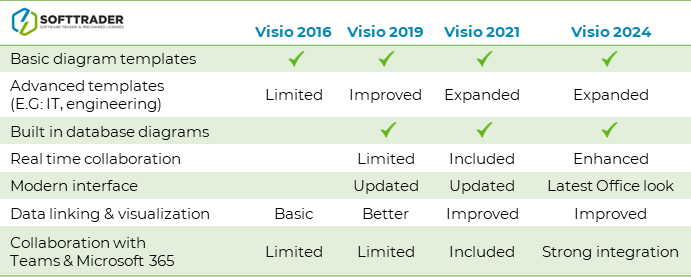 Note: This comparison reflects typical upgrades and feature expansions across versions.Which Version Should You Choose?
Choose Visio Standard: if you are an individual or small team and need core diagramming tools without advanced features.
Choose Visio Professional: if you require advanced templates, richer data integration, better collaboration across teams, and professional use in medium to large organizations.
Choose Visio 2024: if you want the latest features, modern interface, improved collaboration in Microsoft 365 and longer support into the future.
Consider Visio 2021: as a solid mid-range choice with good collaboration features and templates at a potentially lower one-time cost.
Do you have questions? Contact us!
Would you like advice on which Microsoft software or licensing option best fits your needs? Our experts are happy to help you make the right choice. We are available from Monday to Friday from 9 a.m. to 5 p.m.
FAQ
What is the difference between Microsoft Visio Standard and Professional?
Microsoft Visio Standard includes essential tools for creating basic diagrams such as flowcharts, simple organization charts, and timelines. Microsoft Visio Professional includes all Standard features plus advanced templates, data linking, validation rules, and enhanced collaboration options. Visio Professional is better suited for business environments that require complex and data driven diagrams.
Read more about the comparison between different Microsoft Visio versions.
Is Microsoft Visio included in Microsoft 365?
Microsoft Visio is not included by default in Microsoft 365 subscriptions. It is available as a separate purchase, either as a one-time license such as Visio 2021 or Visio 2024, or as a subscription through Visio Plan 1 or Visio Plan 2.
Read more about the different Microsoft Visio pricing options.
What is the latest version of Microsoft Visio?
The latest one-time purchase version of Microsoft Visio is Visio 2024. It offers a modern interface, updated templates and shapes, improved collaboration, and stronger integration with Microsoft 365 services.
Read more about Microsoft Visio 2024.
Should I choose Visio 2021 or Visio 2024?
Visio 2021 is a good option if you want a stable version with solid features at a lower cost. Visio 2024 is the better choice if you want the newest features, a modern user interface, longer support, and better collaboration with Microsoft 365 tools such as Teams and OneDrive.
Read more about the differences between the Microsoft Visio versions.
Can I collaborate with others in Microsoft Visio?
Yes, collaboration is supported in newer versions of Microsoft Visio. Visio Professional editions allow multiple users to work on the same diagram, especially when files are stored in OneDrive or SharePoint. Collaboration features are more advanced in Visio 2021 and Visio 2024 compared to older versions.
Read more about working together on Microsoft Visio.
Does Microsoft Visio support data visualization?
Yes, Microsoft Visio allows you to connect diagrams to data sources such as Excel. This enables data driven visuals, live data updates, and automatic refreshes. These features are mainly available in Microsoft Visio Professional.
Read more about importing and linking external data for Microsoft Visio.
Can I open older Visio files in newer versions?
Yes, newer versions of Microsoft Visio can open files created in older versions such as Visio 2016 or Visio 2019. This ensures compatibility and makes it easy to upgrade without losing existing diagrams.
Is Microsoft Visio suitable for large organizations?
Microsoft Visio Professional is well suited for medium and large organizations. It offers advanced diagramming, data integration, collaboration, and security features that support complex business and IT environments.
Read more about the different Microsoft Visio pricing options.