
What is Microsoft SQL Server 2025?
Microsoft SQL Server 2025 is a relational database management system (RDBMS) from Microsoft for storing, managing, and analyzing data. The platform is used worldwide for a wide range of applications, such as transaction processing (OLTP), data analysis, and reporting (BI). SQL Server supports both on-premises environments and hybrid scenarios with Microsoft Azure, and is a popular alternative to other enterprise databases such as Oracle Database and IBM Db2.
SQL Server is more than just a database: it is a database server that provides services to applications and users via the SQL language (Structured Query Language). This allows systems to efficiently process data within a client-server model and execute complex queries on structured data.
Microsoft SQL Server 2025 Standard or Enterprise?
The main difference between SQL Server 2025 Standard and Enterprise lies in scalability, performance, availability, and advanced features.
SQL Server 2025 Standard is designed for smaller organizations and departments. It provides a solid foundation for database management and standard reporting and analytics tasks.
SQL Server 2025 Enterprise is designed for larger organizations with mission-critical workloads. This edition offers extensive capabilities for performance, security, and high availability, and is suitable for large databases and demanding production environments.
Choosing the right edition:
Do you need enterprise functionality and maximum scalability? → Enterprise is appropriate.
Do you need a stable, cost-efficient SQL Server for standard workloads? → Standard is usually sufficient.
SQL Server 2025 Standard: A strong foundation for your business
The SQL Server 2025 Standard edition is suitable for small to medium-sized businesses and teams. It provides essential capabilities for database management, reporting, and analytics. The edition is suitable for both on-premises installations and hybrid environments, and supports modern development and management tools that allow organizations to manage their databases efficiently with limited IT resources.
SQL Server 2025 Enterprise: The leader in advanced data management
The SQL Server 2025 Enterprise edition provides a comprehensive solution for larger organizations. This edition is designed for mission-critical workloads and scenarios where high performance, scalability, and maximum availability are essential. Enterprise also offers extensive options for data analysis, security, and management, including support for large environments and intensive workloads.
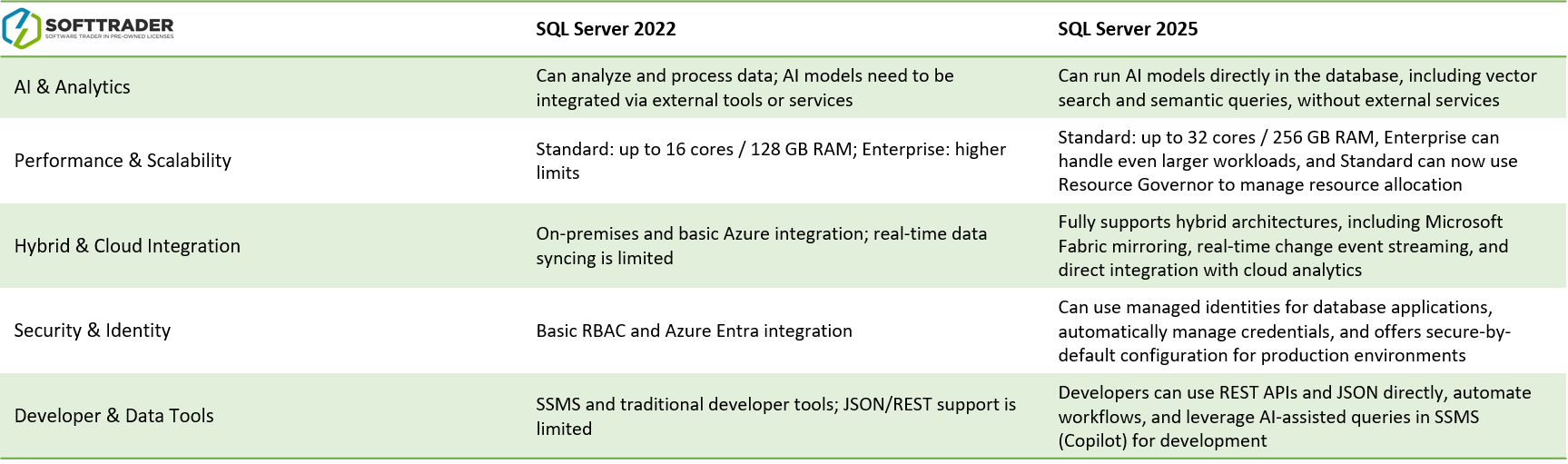
SQL Server 2025 vs SQL Server 2022
SQL Server 2022 is a popular choice for hybrid deployments and Azure integration. SQL Server 2025 builds on this foundation and adds improvements in performance, security, management, and modern integration capabilities.
Which version is best for you?
Choose SQL Server 2022 if you prioritize stability and are already running on this version.
Choose SQL Server 2025 if you want to take advantage of the latest features, improvements, and a longer future-proof lifecycle.
Why upgrade to SQL Server 2025?
Many organizations upgrade to make their database environment more modern, secure, and future-proof. An upgrade to SQL Server 2025 can provide benefits such as better performance, enhanced security features, and optimizations for modern workloads. Additionally, upgrading can help to scale more efficiently with growing databases, optimize query performance, improve management and monitoring, and make full use of new features and longer support periods.
Microsoft SQL Server 2025 End of Life (EoL)
CALs for Microsoft SQL Server 2025
CAL stands for Client Access License. A CAL gives a user or device the right to connect to a SQL Server licensed under the Server + CAL model. There are two types of CALs:
Microsoft SQL Server 2025 User CALs
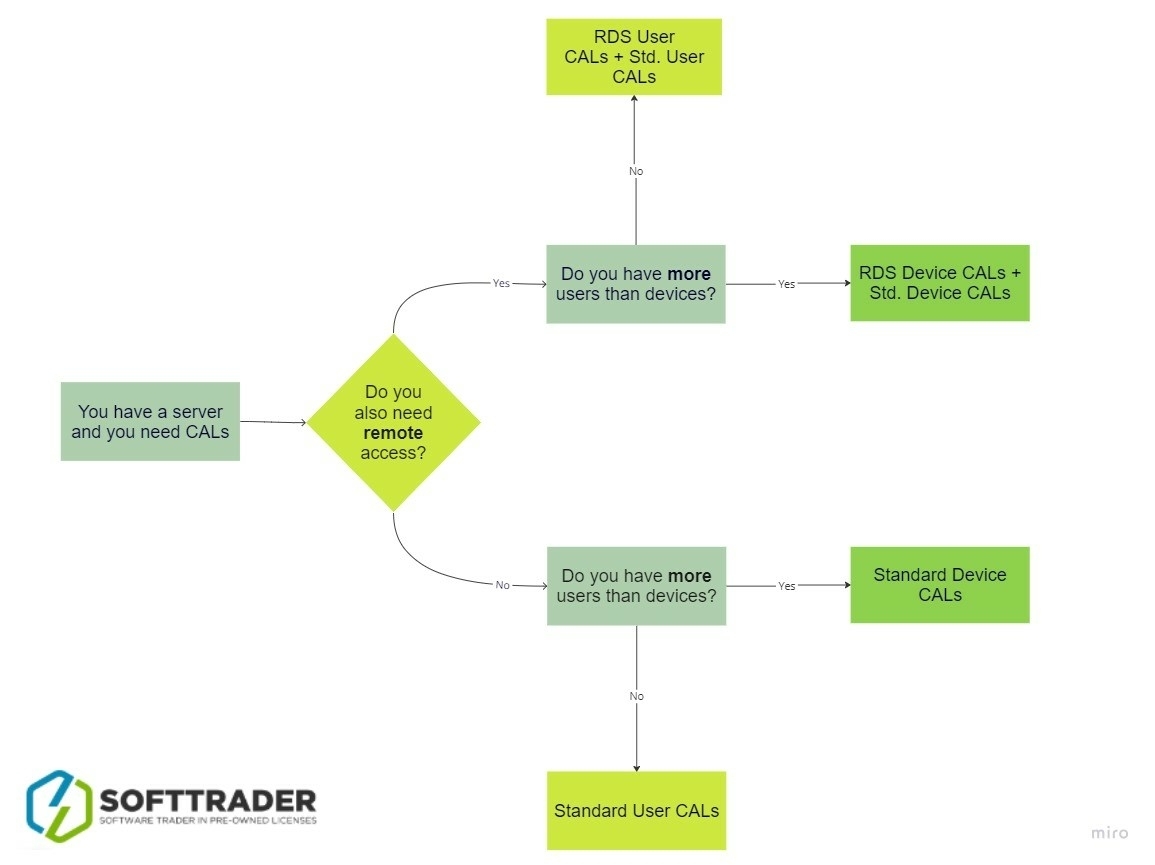
User CALs give a single user access to SQL Server, regardless of how many devices that person uses (e.g., laptop, smartphone, tablet, and PC). The User CAL is purchased in addition to the Server license.
Microsoft SQL Server 2025 Device CALs
Device CALs give a single device access to SQL Server, regardless of how many users use that device. This is often beneficial when multiple employees share the same workstation.
Remote access to SQL Server 2025
SQL Server 2025 can be used both locally and remotely. Access is governed by the standard CAL rules (User or Device), depending on your licensing model.
When users access SQL Server via Remote Desktop Services (RDS) on a Windows Server environment, additional RDS licensing may be required. The licensing principle remains: everyone who accesses SQL Server must be properly licensed.
CALs are NOT included with Microsoft SQL Server 2025 Standard or Enterprise licenses and must be purchased separately.